
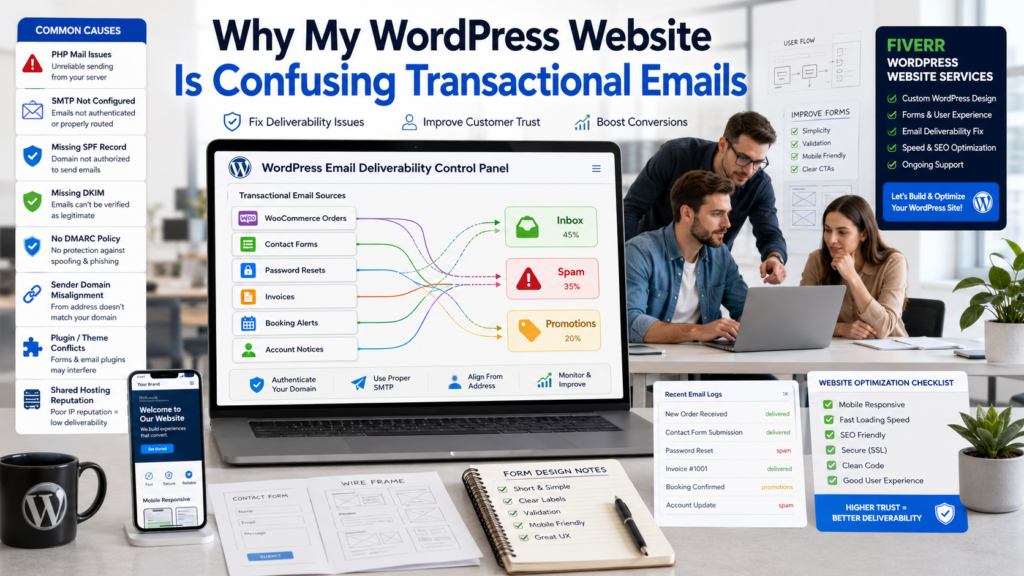
One evening, I opened a small WordPress store for a client. The owner looked tired. Customers were paying, but some did not get order emails. Password reset emails were going to spam. The contact form said “sent,” but no message came to the inbox.
That was when I understood the real pain behind why my WordPress website is confusing transactional emails. It is not only a tech problem. It can break trust. It can lose sales. It can make a good website feel unsafe.
Transactional emails are the emails your website sends after a user does something. They must be fast, clear, and trusted. Reference articles link many WordPress email issues to weak default sending, missing SMTP, bad sender setup, and missing authentication records.
In this guide, I will explain why my WordPress website's confusing transactional emails happen, how to fix it, and when a skilled WordPress team can save you time and stress.
Fresh Roadmap
What Transactional Emails Are
Before fixing why my WordPress website is confusing transactional emails, you need to know what these emails do.
A transactional email is sent because one person takes one action. It is not a newsletter. It is not a sales campaign. It is an expected message. Examples include order emails, reset links, account notices, form alerts, and receipts.
| Email Type | User Action | Why It Matters |
|---|---|---|
| Order confirmation | Customer buys | Builds trust after payment |
| Password reset | User asks for reset | Helps account access |
| Contact form alert | Visitor submits form | Helps you reply fast |
| Invoice or receipt | Payment completes | Gives proof |
| Booking notice | User books time | Confirms next step |
Email Type User Action Why It Matters Order confirmation: Customer buys, builds trust after payment. Password reset: User asks for a reset. Helps account access Contact form alert The visitor submits the form. Helps you reply fast Invoice or receipt Payment is complete, giving proof. Booking notice: User books time Confirms next step
These emails are small, but they are important. If they fail, people feel unsure.
Why WordPress Gets Emails Wrong
The main reason behind why my WordPress website is confusing transactional emails is poor email setup.
WordPress often depends on PHP mail through the hosting server. That basic method can miss strong authentication, clear sender identity, and delivery tracking. Some hosts also limit PHP mail to stop abuse, which can cause real emails to fail. Easy WP SMTP also notes that incorrect SMTP details, weak sender reputation, sending limits, and server-side issues can hurt delivery.
Common Causes and Fixes
| Problem | What Happens | Simple Fix |
|---|---|---|
| No SMTP | Emails fail or go to junk | Use SMTP plugin |
| Wrong sender | Inbox does not trust it | Use domain email |
| Missing SPF, DKIM, DMARC | Email looks fake | Add DNS records |
| Too many plugins | Mixed email behavior | Use one sender path |
| Weak subject line | Users ignore it | Make it clear |
| Shared hosting issue | Bad IP reputation | Use trusted mail service |
Problem: What Happens? Simple Fix No SMTP Emails fail or go to junk. Use the SMTP plugin. Wrong sender. Inbox does not trust it. Use a domain email. Missing SPF, DKIM, and DMARC emails look fake. Add DNS records Too many plugins Mixed email behavior Use one sender path. Weak subject line Users ignore it. Make it clear Shared hosting issue Bad IP reputation Use a trusted mail service.
This is why my WordPress website's confusing transactional emails should never be ignored. It shows that your site needs a cleaner email system.
The PHP Mail Problem
Many beginners think WordPress email should “just work.” I understand that. I used to think the same.
But PHP mail is basic. It may not prove that the message really comes from your domain. It can also depend on the hosting server. If the server has a weak reputation, your emails can suffer.
So when someone asks why my WordPress website is confusing transactional emails, I first check the sending method. If the site still uses default mail, that is a big warning sign. One reference also says WordPress uses wp_mail through the host’s PHP mail system by default, which can lead to spam, failed authentication, and no delivery logging.
SMTP Makes Emails More Reliable
SMTP means Simple Mail Transfer Protocol. In basic words, it is a safer way to send website emails through a real email server.
An SMTP plugin connects your WordPress site to a trusted email service. This can improve delivery, testing, logging, and trust.
You do not need many tools. You need one clean setup. This is one strong answer to why my WordPress website is confusing transactional emails.
Top-Rated Ecommerce Website Builder Agency
Custom setups for Shopify, WooCommerce, & Magento. Get secure code, fast delivery, and 24/7 support.
Our team can build or redesign your WordPress website with clean forms, clear user flow, and a professional setup that supports better communication.
Sender Name and Domain Problems
Another reason for why my WordPress website is confusing transactional emails is a poor sender address.
If emails come from wordpress@yourdomain.com, users may not trust them. If your site uses your business domain but sends from a free Gmail address, email providers may also doubt it. Easy WP SMTP says your “From” email should match your domain, and using a free email service can hurt deliverability.
Better sender emails are support@yourdomain.com, orders@yourdomain.com, or hello@yourdomain.com. Your sender name should also be clear. Use your brand name instead of “WordPress.” Small details help users feel safe.
SPF, DKIM, and DMARC in Simple Words
These names sound hard, but the idea is simple.
SPF, DKIM, and DMARC are like ID cards for your email. They help inbox providers know your message is real. Email delivery guides often suggest these records because they can reduce spam problems and improve trust.
| Record | Simple Meaning | Why You Need It |
|---|---|---|
| SPF | Says who can send for your domain | Blocks fake senders |
| DKIM | Adds a digital signature | Proves message is real |
| DMARC | Gives rules when checks fail | Protects your brand |
Record Simple Meaning: Why You Need It: SPF Who says you can send for your domain? Blocks fake senders' DKIM Adds a digital signature Proves message is real. DMARC gives rules when checks fail. Protects your brand
If these records are missing, emails may go to junk. This is a common cause of why my WordPress website is confusing transactional emails.
Too Many Plugins Can Create Confusion
WordPress plugins are useful. But too many email plugins can create messy results.
WooCommerce may send order emails. A form plugin may send admin alerts. A membership plugin may send account emails. A newsletter plugin may send promotions.
If each plugin uses a different sender name, template, or sending path, the site becomes confusing.
This is why my WordPress website's confusing transactional emails become a full website management issue, not just an inbox issue.
Simple Email Map
| Email Source | Purpose | Email Type |
|---|---|---|
| WooCommerce | Orders and invoices | Transactional |
| Contact form | Admin and user alerts | Transactional |
| Membership plugin | Account notices | Transactional |
| Newsletter plugin | Offers and updates | Marketing |
| Booking plugin | Booking details | Transactional |
Email Source Purpose Email type: WooCommerce orders and invoices are transactional. Contact form, admin, and user alerts Transactional Membership Plugin Account Notices Transactional Newsletter offers plugins and updates. Marketing Booking Plugin Booking details: Transactional
This map helps separate important emails from marketing emails.
Clear Email Templates Build Trust
Sometimes emails arrive, but users still feel confused.
The subject line may be weak. The logo may be missing. The button may not be clear. The email may not match the website design. The Fawa News reference also points out that vague subject lines can make users ignore important emails.
This is another reason for why my WordPress website is confusing transactional emails.
Use clear subject lines like “Reset Your Password,” “Your Order Is Confirmed,” or “We Received Your Message.” Do not use vague subjects like “New Message” or “Update.”
Personal Experience: What I Learned
I once worked on a WordPress site where the owner thought the contact form was broken. After testing, I saw the form was sending emails, but they were going to spam.
The site used a free email address. There was no SMTP. The form plugin had old settings. The email subject was unclear.
We fixed the sender email, added SMTP, checked DNS records, changed the form subject, and tested again. The owner started getting leads properly.
That project taught me one thing: why my WordPress website confusing transactional emails is usually not one problem. It is many small problems together.
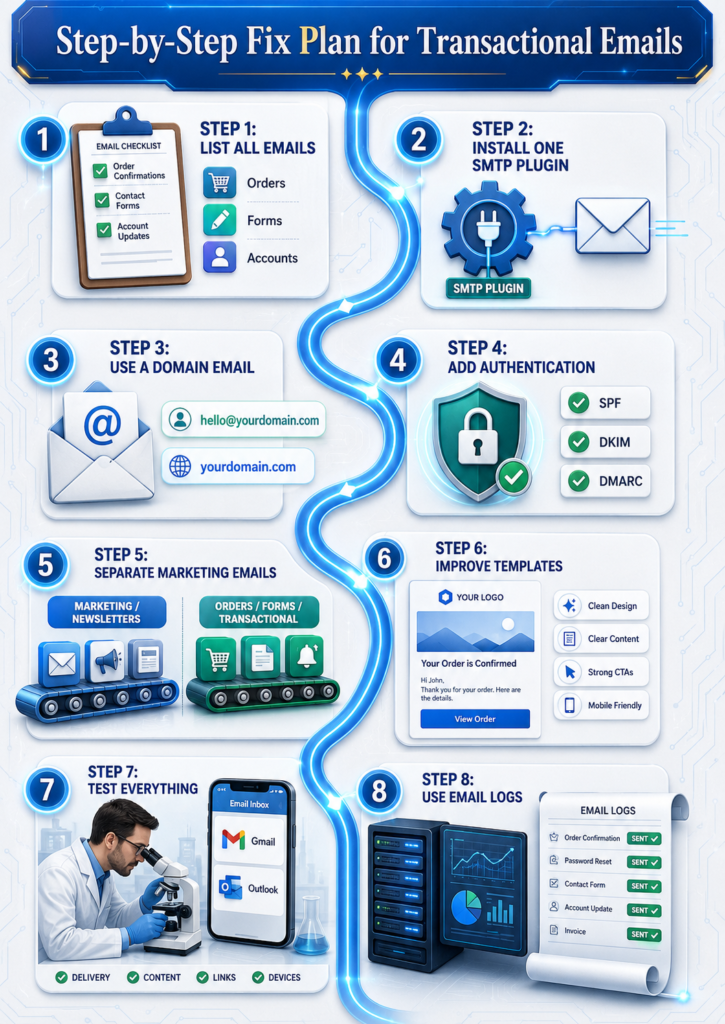
My practical tips are simple: use a business domain email, set up SMTP, test forms after plugin updates, keep subjects clear, keep newsletters separate, check spam during testing, and use email logs.
Why WordPress Design Also Matters
You may think this topic is only about email. But design also matters.
If your website has confusing forms, unclear checkout steps, weak buttons, or messy account pages, users may not know what email to expect.
A clean WordPress design guides visitors before and after they act. Our team builds WordPress websites with clear service sections, simple contact forms, trust blocks, and mobile-friendly layouts.
Top-Rated Ecommerce Website Builder Agency
Custom setups for Shopify, WooCommerce, & Magento. Get secure code, fast delivery, and 24/7 support.
Hire our team on Fiverr if you want a clean, modern WordPress website that looks professional and supports better customer communication.
Our team can improve your WordPress website design, contact forms, page flow, and trust signals so your site feels professional from first click to final email.
Final Checklist
Before you say the issue is fixed, check this: SMTP is active, sender email uses your domain, SPF, DKIM, and DMARC are set, forms are tested, WooCommerce emails are tested, password reset emails work, email logs are enabled, marketing emails are separate, subject lines are clear, mobile forms work well, and website design feels simple.
If these are done, my WordPress website's confusing transactional emails become much easier to solve.
Conclusion
Now you know the real answer behind why my WordPress website is confusing transactional emails.
It often happens because of weak default email sending, missing SMTP, poor sender details, missing DNS records, plugin conflicts, unclear templates, or shared hosting problems.
The good news is simple. You can fix it with a clean email setup, clear website structure, better testing, and a professional WordPress design.
Your website should not confuse customers. It should guide them, help them, and send the right message at the right time.
Top-Rated Ecommerce Website Builder Agency
Custom setups for Shopify, WooCommerce, & Magento. Get secure code, fast delivery, and 24/7 support.
Let our team design a clean, trusted, and business-ready WordPress website for you.
FAQs
How to fix WordPress not sending email issues?
Install an SMTP plugin, use a domain email, add SPF, DKIM, and DMARC, then test emails.
Why are people moving away from WordPress?
Some want simpler tools with less maintenance. WordPress is still strong when managed well.
Why are my website emails going to junk?
They may lack authentication, use a poor sender, or come from a weak server reputation.
What is the 12-second rule for emails?
It means people decide very fast if an email matters. Keep the subject and message clear.