I still remember the first time I helped redesign a WordPress website. The owner told me, “I just want it to look modern.” But after I opened the site, I saw the real problem. The pages were slow. The menu was messy. The contact form did not work well. Some old links were broken. The blog had useful posts, but no one could find them.
That day taught me something important: a redesign is not only about a new look. It is about making the whole website easier, faster, safer, and better for visitors.
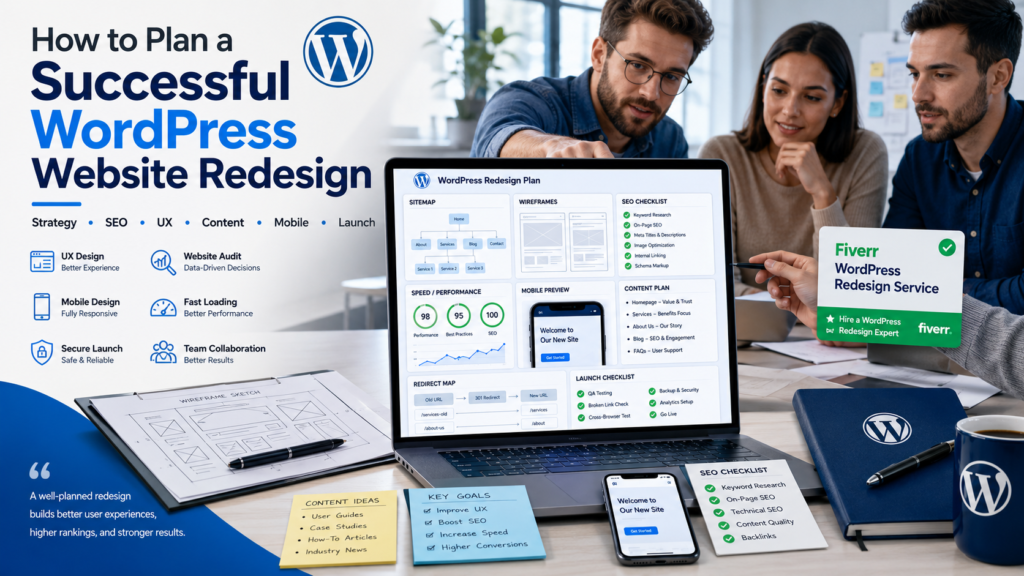
So, if you are wondering how to plan a successful WordPress website redesign, this guide will help you step by step. I will keep it simple. I will also share real thoughts from my own experience, because I know how stressful this project can feel.
Professional sources also agree that a strong redesign starts with clear goals, content planning, SEO care, testing, and a safe launch process.
Table of Contents
Why You Must Know How to Plan a Successful WordPress Website Redesign
When people ask me how to plan a successful WordPress website redesign, I always say this first: do not start with colors.
Yes, colors matter. Fonts matter too. But your website is not just a pretty poster. It is your online shop, office, portfolio, or business home.
A smart redesign can help you:
| Better user experience | Visitors stay longer | Clear menu and easy buttons |
| Faster loading speed | People do not leave early | Optimized images and clean code |
| Better SEO | Google can understand your site | Good titles, headings, and URLs |
| More leads or sales | Your site becomes useful for business | Strong contact form or order button |
| Easier editing | You save time later | Clean WordPress dashboard |
Redesign Goal: Why It Matters Simple Example: Better user experience Visitors stay longer. Clear menu and easy buttons Faster loading speed People do not leave early. Optimized images and clean code Better SEO means Google can understand your site. Good titles, headings, and URLs More leads or sales Your site becomes useful for business. Strong contact form or order button Easier editing. You save time later. Clean WordPress dashboard
So before you change anything, you need a clear plan.
Planning a Redesign? Don't Risk Your Live Traffic!
The biggest mistake in a redesign is breaking your active website setup.
Safely clone your existing WordPress site into a secure staging environment. Get an exact duplicate or a fresh Elementor page replica to test your new design before going live.
Clone & Duplicate Safely Today →Our team can help you turn a messy WordPress website into a clean, modern, and business-ready website. We do not only design pages. We plan the full user journey.
Start With Clear Goals for How to Plan a Successful WordPress Website Redesign
The first step in how to plan a successful WordPress website redesign is to ask a simple question:
Why do I want to redesign this website?
Do you want more calls? More sales? More email subscribers? A better mobile design? A faster site? A more trusted brand look?
Do not say, “I want a better website.” That is too general. Say something clear, like:
| Bad Goal | Better Goal |
|---|---|
| Make the site look nice | Improve trust with a clean homepage and better service pages |
| Get more traffic | Improve blog SEO and fix old pages |
| Get more customers | Add stronger CTAs and better contact forms |
| Make it faster | Reduce heavy plugins and optimize images |
Bad Goal, Better Goal Make the site look nice. Improve trust with a clean homepage and better service pages. Get more traffic. Improve blog SEO and fix old pages Get more customers. Add stronger CTAs and better contact forms. Make it faster. Reduce heavy plugins and optimize images.
A redesign plan works better when goals are clear and measurable. WPM says clear goals help guide each decision during the redesign.
Simple Goal Questions
Ask yourself:
- What is not working now?
- What pages bring the most visitors?
- What pages bring no results?
- What do customers ask again and again?
- What should the visitor do after landing on the site?
When I work on a redesign, I write the answers in one document. It keeps the project calm. Without this, every small idea becomes “urgent,” and the project becomes confusing.
Audit Your Current Website Before You Touch the Design
The next part of how to plan a successful WordPress website redesign is the website audit.
This means you look at your current website and check what is good, what is weak, and what must be fixed.
You should check:
| Audit Area | What to Check | Why It Matters |
|---|---|---|
| Design | Is it modern and clean? | Builds trust |
| Mobile view | Does it work on phones? | Most users browse on mobile |
| Speed | Does it load fast? | Slow sites lose visitors |
| SEO | Are titles, meta, and headings good? | Helps ranking |
| Content | Is the text useful and fresh? | Helps users decide |
| Forms | Do contact forms work? | Brings leads |
| Security | Are plugins and WordPress updated? | Protects your site |
Audit Area: What to Check, Why It Matters, Design: Is it modern and clean? Builds trust. Mobile view: Does it work on phones? Most users browse at mobile speed. Does it load fast? Slow sites lose visitors. SEO: Are titles, meta, and headings good? Helps ranking content. Is the text useful and fresh? Helps users decide on forms. Do contact forms work? Brings leads. Security: Are plugins and WordPress updated? Protects your site
Kubio also suggests checking KPIs like bounce rate, conversion rate, SEO ranking, and speed before deciding if a redesign is needed.
Do Not Delete Good Content
This is a big mistake I have seen many times.
A business owner deletes old pages because they “look old.” But some of those pages may bring traffic from Google. If you remove them without a plan, your traffic can drop.
That is why how to plan a successful WordPress website redesign must include content checking.
Keep what works. Improve what is weak. Remove only what has no value.
Build a Simple Website Structure
A clean structure is the heart of how to plan a successful WordPress website redesign.
Your menu should be easy. Your pages should connect in a natural way. Your visitors should not feel lost.
A simple service business website may need:
- Home
- About
- Services
- Portfolio
- Blog
- Contact
An online store may need:
- Home
- Shop
- Product categories
- Cart
- Checkout
- FAQ
- Contact
WPMarmite recommends planning the site tree, menus, footer links, blog categories, and user paths before building.
Use Wireframes Before Full Design
A wireframe is like a simple page map. It shows where the headline, images, buttons, and sections will go.
You do not need fancy tools. A paper sketch can work. But for a serious business website, a digital wireframe is better.
This helps you see the page before spending time on full design.
Plan SEO Before Launch, Not After
Many people learn how to plan a successful WordPress website redesign too late. They build the site first and think about SEO after launch.
That is risky.
SEO should be part of the plan from day one.
You should prepare:
- Main keywords for each page
- SEO titles
- Meta descriptions
- Image alt text
- Clean URLs
- Internal links
- Redirects from old URLs to new URLs
WPMarmite warns that URL changes can create 404 errors if redirects are not planned. These errors can hurt SEO and user experience.
Create a Redirect Plan
If your old page was:
/old-service-page
And your new page is:
/wordpress-design-service
You need a 301 redirect.
This tells Google and visitors where the new page is. It protects your old traffic.
Skip the Planning Stress. Get a Done-For-You Redesign.
Turn your outdated UI into a high-converting, mobile-responsive, and modern digital asset. We handle everything from complete architectural overhauls to clean visual upgrades.
Our team can redesign your WordPress website with SEO-friendly page structure, clean URLs, fast loading, and proper setup. That means your website looks good and works for real business goals.
Choose the Right Theme, Plugins, and Builder
Another key part of how to plan a successful WordPress website redesign is choosing the right tools.
Do not install too many plugins. Too many plugins can make the site slow and hard to manage. WPM also notes that fewer plugins can make a site faster, safer, and easier to maintain.
Choose a theme that is:
- Mobile responsive
- SEO-friendly
- Updated often
- Compatible with key plugins
- Easy to edit
- Fast loading
Do You Need a Page Builder?
Page builders like Elementor, Gutenberg, or other modern builders can help you edit pages easily. But the builder must be used with care.
A beautiful website with messy sections is still a problem.
Our team uses clean layouts, simple sections, clear CTAs, and user-friendly design. We focus on what visitors need, not only what looks fancy.
Why Hire Our Team for Your WordPress Website Redesign?
You can try to redesign your site alone. But if your website is important for your business, a professional team can save you time, stress, and mistakes.
When people ask how to plan a successful WordPress website redesign, I often tell them this: planning is easy to talk about, but hard to do alone.
You need design sense. You need WordPress skills. You need SEO care. You need speed optimization. You need mobile testing. You need launch safety.
That is why our team offers professional WordPress website design services on Fiverr.
What Our Team Can Help With
Service Area: What Our Team Does: Website redesign planning We review your old site and plan improvements. WordPress design: We create clean, modern, responsive pages. SEO setup: We structure headings, meta, and page flow. Speed Care: We optimize images and reduce heavy layout issues. Mobile design: We make sure your site works on phones. Lead-focused layout We place CTAs, forms, and trust sections. Launch support: We help check the site before it goes live.
| Service Area | What Our Team Does |
|---|---|
| Website redesign planning | We review your old site and plan improvements |
| WordPress design | We create clean, modern, responsive pages |
| SEO setup | We structure headings, meta, and page flow |
| Speed care | We optimize images and reduce heavy layout issues |
| Mobile design | We make sure your site works on phones |
| Lead-focused layout | We place CTAs, forms, and trust sections |
| Launch support | We help check the site before it goes live |
Don’t Just Redesign. Re-Engineer Your Business.
Get fast loading layouts, professional staging deployment, and elite Elementor modifications that turn visitors into buyers.
Order our Fiverr gig if you want a WordPress website that looks professional, feels easy to use, and supports your business goals.
Test the Website Before You Go Live
Testing is a must in how to plan a successful WordPress website redesign.
Never launch a new design without checking it first.
Test these things:
- All buttons
- All forms
- Menu links
- Footer links
- Mobile view
- Tablet view
- Page speed
- Checkout, if it is an online store
- Contact emails
- Thank-you pages
- 404 errors
- Redirects
- Analytics
- Security plugins
WPMarmite recommends testing redirects, performance, opt-in points, contact forms, and payment functions before launch.
Use a Staging Site
A staging site is a private copy of your website. You can redesign there without breaking your live site.
This is very important.
I have seen people edit their live website directly and break the homepage. Visitors came and saw broken sections. That can damage trust.
A staging site keeps your real website safe while the new one is being built.
Experience:
Here is my honest experience.
The worst redesign projects usually fail for one reason: the owner starts too fast.
They see a nice template and say, “Use this.” But they do not check content. They do not check old traffic. They do not plan the menu. They do not think about mobile users.
Then, after launch, they ask why leads dropped.
In one project, I saw a site with a beautiful homepage. But the contact button was too low. Most visitors never reached it. After moving the CTA higher and making the service section clearer, the site felt much better.
This is why how to plan a successful WordPress website redesign is not only about design. It is about user action.
My simple advice:
- Keep your best pages.
- Remove confusion.
- Make buttons clear.
- Use simple words.
- Make mobile design a priority.
- Test everything.
- Do not redesign without a goal.
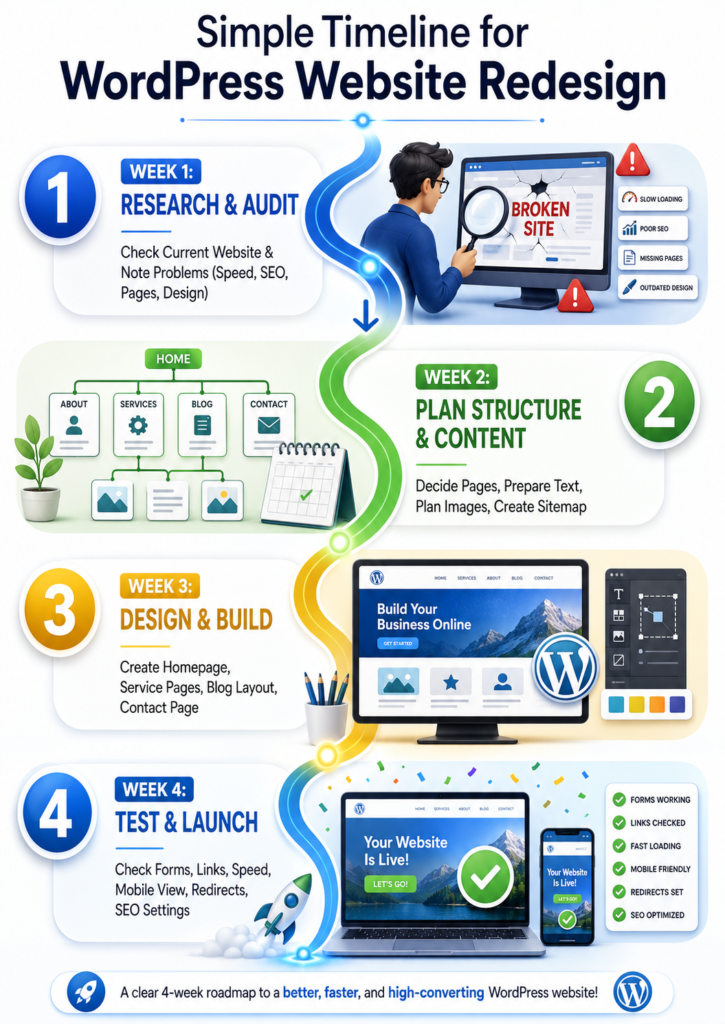
A Simple Timeline for How to Plan a Successful WordPress Website Redesign
Planning a Redesign? Don't Risk Your Live Traffic!
The biggest mistake in a redesign is breaking your active website setup.
Safely clone your existing WordPress site into a secure staging environment. Get an exact duplicate or a fresh Elementor page replica to test your new design before going live.
Clone & Duplicate Safely Today →Our team can handle the hard parts for you, from planning to design to final testing.
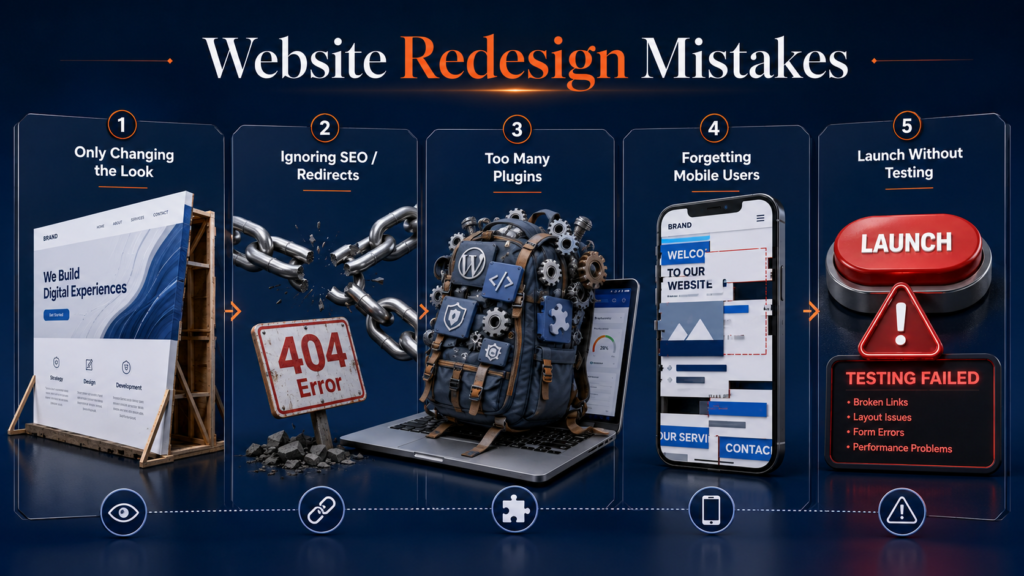
Common Mistakes to Avoid
Final Checklist for How to Plan a Successful WordPress Website Redesign
Before launch, use this checklist:
- I know my redesign goals.
- I have checked my current website.
- I know which pages to keep.
- I have planned the new menu.
- I have written or improved page content.
- I have selected the right theme and tools.
- I have created SEO titles and meta descriptions.
- I have planned redirects.
- I have tested forms and links.
- I have checked mobile design.
- I have checked speed.
- I have connected analytics.
- I have made a backup.
If you can say yes to these points, you are ready.
Conclusion
Now you know how to plan a successful WordPress website redesign in a simple way.
Start with goals. Audit your old site. Plan your pages. Protect your SEO. Choose the right tools. Build on a safe setup. Test before launch.
A redesign can make your business look more trusted. It can help visitors understand you faster. It can bring more leads, sales, and confidence.
But you do not have to do it alone.
Our team is ready to help you create a modern, clean, fast, and professional WordPress website design on Fiverr.
Skip the Planning Stress. Get a Done-For-You Redesign.
Turn your outdated UI into a high-converting, mobile-responsive, and modern digital asset. We handle everything from complete architectural overhauls to clean visual upgrades.
Let our team turn your old website into a better online home for your business.
FAQs
How to redesign a website in WordPress?
Back up your site, audit your pages, choose a theme, rebuild pages, test everything, and launch safely.
How to plan a website redesign?
Set goals, check your current site, plan content, create a sitemap, protect SEO, and test before launch.
Why are people moving away from WordPress?
Some people want simpler tools. Others dislike updates, plugins, or maintenance. But WordPress is still powerful when managed well.
Can ChatGPT build a WordPress website?
ChatGPT can help with ideas, content, and code. But a real WordPress website still needs setup, design, testing, and expert care.