I still remember the first time I saw a business owner panic because his website stopped working. It was a small service business, not a big company. But that website brought him calls, trust, and leads every week.
One morning, his contact form stopped sending messages. He did not know. For almost two weeks, people filled out the form, clicked submit, and waited. No email reached him. He thought business was slow. The real problem was simple: no one was doing WordPress website maintenance.
That day taught me a clear lesson. A WordPress site is not something you build once and forget. It is like a shop, a car, or your phone. It needs care, cleaning, updates, and safety checks.
A good website can help your business look strong. A broken or slow website can quietly push people away. This is why WordPress website maintenance is not just a tech task. It is business protection.
Is Your WordPress Site Safe, Updated & Fast?
Don't wait for a fatal error or malware attack to ruin your business. Our expert WordPress maintenance service handles core updates, daily cloud backups, security patches, and speed optimization flawlessly while you focus on growth.
Table of Contents
What is WordPress website maintenance?
WordPress website maintenance means taking care of your WordPress site after it is built. It keeps your website safe, fast, updated, and working well.
It includes plugin updates, theme updates, backups, security scans, speed checks, broken link checks, form testing, and small content fixes.
The reference guides all make one thing clear: WordPress changes often. Plugins change. Themes change. Security risks change. A website may look fine on the outside, but inside, old code and hidden errors can grow over time. WordPress is also a large target because it powers a big part of the web, and many weak points come from old plugins, missed updates, and poor backups.
Why Your Website Needs Care Every Month
Many business owners think, “My website is live, so I am done. I understand this thought. I used to think the same way when I first worked with websites.
But the internet does not stand still. Browsers update. Phones update. Google changes. Hackers find new weak points. Plugins release new versions. Your hosting server changes.
If your site does not keep up, small problems can become big problems.
| Problem | What It Can Do to Your Business |
|---|---|
| Old plugins | Create security risks and errors |
| No backup | Make recovery hard after a crash |
| Slow pages | Make visitors leave early |
| Broken forms | Stop leads from reaching you |
| Broken links | Hurt trust and user experience |
| Malware | Damage your brand and search ranking |
Problem: What It Can Do to Your Business Old plugins Create security risks and errors No backup makes recovery hard after a crash. Slow pages make visitors leave early. Broken forms stop leads from reaching you. Broken links hurt trust and user experience. Malware damages your brand and search ranking.
A website should make life easier for your customers. If it loads slowly, shows errors, or sends people to broken pages, they may not tell you. They may just leave.
Personal Experience: Small Issues Can Hurt the Most
From my own real-life work with websites, I have seen that the biggest pain often comes from one small missed task.
I once checked a site that looked beautiful. The colors were nice. The pages were clean. The owner was proud of it. But when I tested the contact form, it did not work. The form showed a success message, but no email arrived.
The owner was shocked. He said, “But people can see the form.” Yes, they could. But seeing a form is not the same as receiving leads.
This is why I always tell clients to test the simple things. Test your forms. Click your buttons. Check your checkout page. Open your website on your phone. Look at it like a customer, not like the owner.
My opinion is simple: WordPress website maintenance is about trust. When people visit your site, they are asking, “Can I trust this business?” A smooth website says yes.
Core tasks in a WordPress website maintenance plan
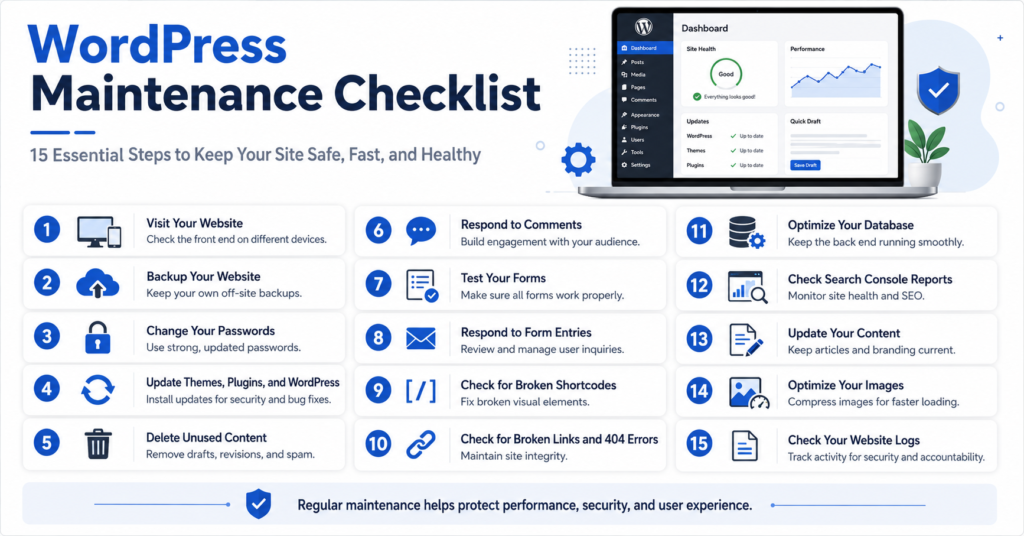
A good WordPress website maintenance plan should be simple, clear, and regular. You do not need to make it confusing.
1. Backups Before Anything Else
A backup is a saved copy of your full website. It should include your files, database, theme, plugins, images, and settings.
A backup should also be stored away from your main server. If your server fails or gets hacked, a backup on the same server may also be lost. Off-server backups, restore testing, and regular checks are key parts of a strong care process.
Backup Task Best Timing Full site backup Weekly or monthly Database backup: daily or weekly Restore the test monthly or quarterly. Check offsite storage monthly.
Never update a live site before taking a backup. This habit can save many hours of stress.
| Backup Task | Best Timing |
|---|---|
| Full site backup | Weekly or monthly |
| Database backup | Daily or weekly |
| Restore test | Monthly or quarterly |
| Offsite storage check | Monthly |
2. Plugin, Theme, and WordPress Updates
Updates are not just for new features. Many updates fix security issues and bugs.
But updates should be done carefully. A plugin update can sometimes break a design, a form, or a checkout page. This is why professional teams test updates and check the site after the work is done.
For business websites, WordPress website maintenance services are useful because a team can update the site, test it, and fix issues before they hurt visitors.
3. Security Checks and User Access
Security is not only about hackers. It is also about user access.
Question: Why It Matters Who has admin access? Old users can be a risk. Are passwords strong? Weak passwords are easy to attack. Is malware scanning active? It can catch hidden threats. Are unused plugins removed? Unused tools can become weak points.
Delete old admin users. Remove plugins you do not use. Use strong passwords. Add login protection. These simple steps matter.
| Question | Why It Matters |
|---|---|
| Who has admin access? | Old users can be a risk |
| Are passwords strong? | Weak passwords are easy to attack |
| Is malware scanning active? | It can catch hidden threats |
| Are unused plugins removed? | Unused tools can become weak points |
4. Speed, Forms, and Real User Checks
A slow site can lose visitors. People do not like waiting. On mobile, this is even more true.
Speed checks should include image size, caching, hosting quality, plugin load, and page design. PageSpeed Insights can help review performance, accessibility, SEO, and best practices. Image compression also helps because heavy images can slow pages down. (Kanopi Studios)
Also test your contact form, quote form, booking button, phone button, and checkout page. A business website is not just a design. It is a lead machine. If the lead machine is broken, beauty does not matter.
WordPress Website Maintenance New York: Why Local Businesses Need It
If you run a local business in a busy market like New York, your website has to work hard. People compare you fast. They search, click, scan, and decide.
For searches like “WordPress website maintenance New York,” the need is clear. Local businesses need websites that load fast, show clear services, work well on phones, and build trust right away.
A restaurant, clinic, agency, lawyer, cleaning company, or repair service cannot afford a broken site. When people need help, they will not wait. They will click the next result.
WordPress website maintenance & care plans: What should be included?
Good WordPress website maintenance & care plans should be easy to understand. You should know what you are paying for and what the team will do each month.
Care Item, Basic Site, Business Site Online Store WordPress updates? Yes, yes, yes. Plugin/theme updates: Yes, yes, yes. Offsite backups: Yes, yes, yes. Security scan: Monthly, weekly. Daily speed check, monthly; monthly, weekly form testing, monthly; monthly, weekly. Small edits: Optional, Included, Included. Checkout testing: No, optional, or yes.
This kind of plan helps you choose the right level of care.
| Care Item | Basic Site | Business Site | Online Store |
|---|---|---|---|
| WordPress updates | Yes | Yes | Yes |
| Plugin/theme updates | Yes | Yes | Yes |
| Offsite backups | Yes | Yes | Yes |
| Security scan | Monthly | Weekly | Daily |
| Speed check | Monthly | Monthly | Weekly |
| Form testing | Monthly | Monthly | Weekly |
| Small edits | Optional | Included | Included |
| Checkout testing | No | Optional | Yes |
WordPress website maintenance packages and cost
Many people ask about WordPress website maintenance packages because they want to know the price before they order.
The WordPress website maintenance cost depends on your website size, traffic, features, and risk level. A small brochure site costs less to maintain than a WooCommerce store with payments, shipping, and many plugins. Published examples from providers show that plans can range from low monthly care to larger expert retainers for complex sites.
Website Type Common Need Possible Monthly Cost Range Small business site updates, backup, and security: $50–$150 Growing business site Care, speed, reports, and edits: $150–$400 WooCommerce store checkout testing and backups: $300–$800+ custom site Advanced support: $500–$1,500+
| Website Type | Common Need | Possible Monthly Cost Range |
|---|---|---|
| Small business site | Updates, backup, security | $50–$100 |
| Growing business site | Care, speed, reports, edits | $100–$300 |
| WooCommerce store | Checkout testing and backups | $300–$400+ |
| Custom site | Advanced support | $500–$700+ |
The best WordPress website maintenance package is not always the lowest price. It is the one that gives you peace of mind.
Why Hire Our Team for WordPress Website Design and Care?
I can share my personal thoughts as one person, but when it comes to service delivery, our team handles the work.
Our team offers professional WordPress Website Design services on Fiverr. We build clean, modern, mobile-friendly websites that are made for trust, speed, and leads. We also understand the care a site needs after launch.
Many people hire a designer only for the first build. Then they get stuck later when updates, design fixes, speed issues, or layout problems appear. Our team works with a long-term mindset. We do not just think, “How will the site look today?” We think, “How will this site help the business tomorrow?”
Is Your WordPress Site Safe, Updated & Fast?
Don't wait for a fatal error or malware attack to ruin your business. Our expert WordPress maintenance service handles core updates, daily cloud backups, security patches, and speed optimization flawlessly while you focus on growth.
When you hire our team, you get more than a design. You get people who understand structure, user experience, WordPress setup, service pages, calls-to-action, and future support needs.
How Our Team Helps Your Website Look Better and Work Better
A strong website needs two things: good design and good care.
Service Area: How It Helps WordPress Website Design Gives your brand a clean online home Mobile responsive design Helps phone users browse easily Landing page design Helps turn visitors into leads Speed-friendly layout Makes pages feel smoother Plugin setup adds useful features safely. Basic SEO structure Helps pages look organized for search Maintenance guidance helps your site stay healthy after launch.
If your current site looks old, loads slowly, or does not bring leads, this is the right time to improve it.
| Service Area | How It Helps |
|---|---|
| WordPress website design | Gives your brand a clean online home |
| Mobile responsive design | Helps phone users browse easily |
| Landing page design | Helps turn visitors into leads |
| Speed-friendly layout | Makes pages feel smoother |
| Plugin setup | Adds useful features safely |
| Basic SEO structure | Helps pages look organized for search |
| Maintenance guidance | Helps your site stay healthy after launch |
Proactive WordPress Maintenance & Support
Speed Audits • Daily Backups • Malware Removal • Version Control
Practical Tips Before You Order a Service
Before you choose any designer or maintenance team, prepare your business name, logo, service list, target location, main goal, and website examples you like. If you already have a site, also prepare your hosting and WordPress login.
This helps the team work faster and better.
Also, be clear about what you need. Do you need a full new design? A redesign? A landing page? A maintenance setup? A WordPress website maintenance plan? Clear goals lead to better results.
Broken Layout? Plugin Errors? We Fix It Instantly!
If a bad plugin update or a broken Elementor layout has messed up your live website, don't panic. We specialize in advanced troubleshooting, custom database cleanups, and seamless redesign restores securely.
Fix / Restore My Website 100% Secure Escrow Order via Fiverr MarketplaceCommon Mistakes Business Owners Make
Many website problems happen because owners do not know what to check.
Mistake: Better Choice: Updating without backup Backup first. Using too many plugins Keep only needed plugins. Ignoring mobile view Test on your phone often. Never testing forms Submit test leads monthly. Keeping old admin users Remove users who no longer need access. Choosing only cheap help Choose skill and trust.
| Mistake | Better Choice |
|---|---|
| Updating without backup | Backup first |
| Using too many plugins | Keep only needed plugins |
| Ignoring mobile view | Test on phone often |
| Never testing forms | Submit test leads monthly |
| Keeping old admin users | Remove users who no longer need access |
| Choosing only cheap help | Choose skill and trust |
Your website may be the first place people meet your business. Keep it clean, safe, and easy to use.
Conclusion:
WordPress website maintenance is not a luxury. It is a basic part of owning a WordPress site.
It protects your work. It protects your leads. It protects your customer trust. It also helps your website stay fast, safe, and ready for people who want to buy from you.
From my own experience, the small checks matter most. A working form, a safe backup, an updated plugin, and a fast page can make a real difference.
If you want a better WordPress website, our team is ready to help with professional WordPress website design on Fiverr. We can build a clean, modern site that supports your business goals and gives you a strong online presence.
Is Your WordPress Site Safe, Updated & Fast?
Don't wait for a fatal error or malware attack to ruin your business. Our expert WordPress maintenance service handles core updates, daily cloud backups, security patches, and speed optimization flawlessly while you focus on growth.
FAQs:
Is WordPress outdated in 2026?
No. WordPress is still widely used in 2026. It is powerful when it is designed and maintained well.
How to maintain a website using WordPress?
Update WordPress, plugins, and themes. Back up the site. Scan for security issues. Test forms and check speed.
Do WordPress websites need maintenance?
Yes. WordPress websites need updates, backups, security checks, and testing.
Is WordPress under maintenance right now?
WordPress itself is not always under maintenance. Your own site may show maintenance mode during updates.